
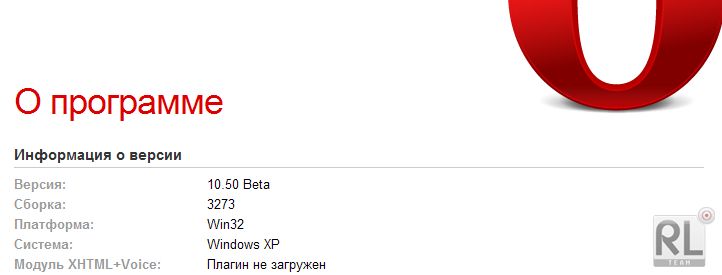
Opera@USB 10.50 build 3275 Beta 2 portable
Скачать
| OC: | Windows XP, Vista, 7, 8, 10 |
| Лицензия: | Бесплатно |
| Язык: | Русский |
| Название: | Яндекс.Пак |
Opera Software выпустила тестовую версию Opera 10.50. Это всего лишь предварительная наработка, которая даже не доросла до стадии публичного тестирования, но опытные пользователи уже могут прикоснуться к будущему. И хотя публиковать pre-alpha версии не в правилах Opera Software, это тот случай, когда разработчику действительно есть чем удивить пользователя.
Ключевым словом, отражающим основные изменения в Opera 10.50, является слово — скорость:
Самым важным нововведением является новый, написанный с нуля, javascript - движок Carakan. По заявлениям разработчиков, в некоторых случаях, новый движок в 7 раз быстрее нынешнего, используемого в Opera 10.10;
В основе Opera 10.50 лежит движок Presto версии 2.5 с массой разнообразных усовершенствований. Помимо прочего, в обновленном движке реализована поддержка CSS3 transitions и transforms и некоторые новые возможности HTML 5. Также отмечается новая, намного более быстрая, система работы с кэшем;
В Opera 10.10 для отрисовки SVG используется графическая библиотека Vega. В Opera 10.50 на плечи Vega легла ответственность за рендеринг всего, что происходит на экране. Опять же, это дает ощутимый прирост в скорости.
Помимо внутренних улучшений для скорости, в Opera 10.50 будут и внешние улучшения для удобства:
Улучшена интеграция с Windows 7 и Vista для лучшей поддержки эффектов интерфейса операционной системы;
Приватные вкладки. После закрытия такой вкладки, никакой информации не сохраняется;
Немодальные окна диалогов. Если в предыдущих версиях разнообразные информационные сообщения типа javascript Alerts или HTTP Authentication блокировали текущую вкладку и было невозможно перейти к другой, то в Opera 10.50 такие сообщения немодальные и можно запросто переключиться на другую вкладку;
Улучшенные адресная и поисковая строки. Теперь они запоминают историю поиска, позволяют удалять элементы из истории и выглядят более наглядно.
Opera — это популярнейший браузер от разработчиков из холодной Норвегии. Имеет собственное, весьма шустрое ядро, благодаря которому способен очень быстро обрабатывать страницы. По сравнению с Internet Explorer, Опера работает гораздо быстрее. Более того, разработчики называют свой браузер самым быстрым в мире, что возможно и спорно, но очень даже близко к истине.
Быстрый рендеринг страниц не единственное достоинство Оперы. В арсенале программы имеется куча всевозможных функций как на прямую связанных с отображением страниц, так и дополнительных: клиент для P2P-сети BitTorrent; простенький менеджер загрузки файлов; IRC-клиент; RSS-клиент; система виджетов (небольшие приложения типа всяких календариков, калькуляторов, записных книжек и т. д. в таком духе).
Opera@USB - версия интернет браузера Opera для установки на переносные устройства хранения данных - флеш-брелки либо флеш диск, но также работает и на локальном диске.
Вы хотите использовать все возможности браузера Opera мобильно – нет проблем!
- отсутствуют нежелательные воздействия на Интернет Эксплорер (Internet Explorer) или другие браузеры
- включая установленную на компьютере версию Opera
- содержимое реестра не подвергается изменению
- работайте на любом ПК с установленной Windows (на работе, в интернет-кафе, на компьютере у друзей...)
- не оставляет никаких данных на чужом компьютере
Что вам нужно для работы с Opera@USB?
- компьютер с подключенным Интернетом
- USB-брелок либо USB флеш (flash) диск (также работает с жесткого диска) с 40 Мб свободного места на нём (для распаковки сборки Оперы).
В эту сборку добавлены: обновленые файлы поисковых систем и "чёрного списка" плагинов; пользовательские скрипты; почти все плагины, а также внутренняя проверка орфографии (словари: английский, русский и украинский).
Краткое описание плагинов, входящих в сборник:
- Shockwave Flash 10.0.45.2 - позволяет просматривать Flash-анимацию на веб-страницах;
- DevalVR 0.7.5.10 - позволяет просматривать 3D-документы;
- Intel Indeo 5.10.2.49 - позволяет просматривать видео файлы;
- DivX Web Player 1.5.0.52 - позволяет просматривать видео файлы;
- RealPlayer 6.0 - позволяет просматривать файлы с расширением *.rpm *.rhp *.rpj и т.п.;
- Microsoft Windows Media Player - позволяет просматривать видео и аудио файлы *.asf *.asx *.wmv *.wma *.wvx *.wm;
- Mozilla ActiveX 1.0.0.4 - позволяет просматривать элементы страниц, сделанных под Mozilla;
- MeadCo's Neptune 2.0.0.29 - позволяет использовать Проводник Windows из Opera;
- InterTrust Redemption Wizard - обеспечивает доступ к PDF документам, защищённых сертификатами DRM;
- DjVu Browser 6.1.1.1574 - позволяет просматривать файлы с расширением *.djvu;
- Quick Time 7.6.5.0 - позволяет работать с потоковыми аудио/видео файлами;
- Netscape iPIX Viewer 6.2.0.3 - позволяет работать с готовыми iPIX-изображениями, помещенными на веб -страницы;
- Shockwave for Director 11.5.6.606 - необходим для работы с файлами Director Netscape;
- Acrobat Reader 9.3.0.148 - позволяет просматривать файлы с расширением *.pdf.
- Google Gears 0.5.33.0 - заставляет браузер работать с локальным кешем страниц (на основе SQLite), периодически синхронизируя кеш с онлайн источником.
Opera 10.50 build 3275 Beta 2 for Windows (24.02.2010)
Highlights
Skin work, and tweaked styling of internal pages (opera:* and error pages)
Improved opera:config
Improved overlay authentication dialogs to avoid spoofing
Context menu fixes
Basic Web Storage user interface
Lots of crash fixes
Widgets fixes
Changelog
User Interface
Core
Crash fixes
Skin
Context Menus
Web Storage
Unite
Widgets
Windows
Разработчик: Opera Software ASA
Windows 98, ME, NT, 2000, XP, Server 2003, 7 и Vista
Язык интерфейса: английский, беларусский, русский и украинский.
Размер: 19.6 Mb
27.02.10


Скачать
| OC: | Windows XP, Vista, 7, 8, 10 |
| Лицензия: | Бесплатно |
| Язык: | Русский |
| Название: | Яндекс.Пак |
-
Бесплатный браузер, созданный компанией «Яндекс». За основу взят движок Blink, который используется в открытом браузере Chromium. Яндекс.Браузер доступен для скачивания на официальном сайте, в наличии версии для Windows, Mac OS, Android и Linux. По итогам 2017 года обозреватель занимает второе место на рынке настольных компьютеров в Рунете. Безопасность Яндекс.Браузер оснащен технологией Protect, которая включает в себя несколько самостоятельных режимов защиты от самых разнообразны...
-
µTorrent: Популярный Torrent Клиент µTorrent является одним из ведущих клиентов для сетей p2р (peer-to-peer) и протокола BitTorrent. Ключевые характеристики: Многопоточная Загрузка и Распределение Полосы Пропускания: Позволяет многопоточную загрузку файлов и эффективно распределяет полосу пропускания для оптимальной производительности. Ограничение Загрузки/Раздачи: Предоставляет возможность установки ограничений на скорость загрузки и раздачи для более гиб...
-
VLC Media Player: Ваш универсальный мультимедийный инструмент VLC Media Player — это медиаплеер, который значительно расширяет возможности воспроизведения медиафайлов на устройствах с Windows. Он предлагает сочетание совместимости, универсальности и удобного интерфейса, что делает его идеальным выбором для просмотра видео, прослушивания аудио и потокового вещания. Поддержка широкого спектра форматов: VLC справляется с воспроизведением практически любых аудио и видео форматов без дополн...
-
LibreOffice — это универсальный набор инструментов для повышения продуктивности и управления офисными задачами на вашем компьютере. Подобно другим продуктам с открытым исходным кодом, таким как OpenOffice.org, LibreOffice предлагает полный спектр офисных инструментов. Основные возможности: Текстовый документ — аналог Microsoft Word. Электронная таблица — как Microsoft Excel. Презентация — подобно Microsoft PowerPoint. Рисование — дополнительные возможности дл...



-
qBittorrent: бесплатный и мощный клиент для работы с сетью BitTorrent Особенности qBittorrent: Интегрированная поисковая система: Программа обладает встроенным поиском, что упрощает процесс поиска и добавления торрент-файлов. Поддержка плагинов: Возможность использовать плагины, расширяющие функциональность приложения, что позволяет пользователям настраивать qBittorrent под свои потребности. UPnP/NAT-PMP: Поддержка протоколов UPnP (Universal Plug and Play) и NAT-PMP (Network...
-
AnyDesk: Удаленный доступ к компьютеру без лишних сложностей AnyDesk — это бесплатная программа для Windows, которая позволяет удаленно управлять другим компьютером. Оба устройства должны иметь установленную программу и разрешить доступ с помощью безопасных ключей. AnyDesk предоставляет доступ к компьютеру, как если бы он был вашим собственным, и является отличной альтернативой TeamViewer и Supremo Remote Desktop благодаря своей совместимости и простоте использования. ...
-
Thunderbird: Бесплатный и Мощный Почтовый Клиент Thunderbird — это бесплатная программа с открытым исходным кодом, которая предоставляет пользователям продвинутый функционал почтового клиента и менеджера новостей. Основные преимущества: Функциональность почтового клиента: Thunderbird позволяет отправлять и получать электронные письма, управлять ими и поддерживает множество почтовых протоколов, таких как POP3, IMAP и SMTP. Менеджер новостей: Пользователи могут подписыва...
-
Telegram Desktop - это десктопная версия одного из самых популярных мессенджеров, предоставляющая широкие возможности для обмена сообщениями и файлами: Обмен текстовыми сообщениями и медиафайлами: Пользователи могут обмениваться текстовыми сообщениями, фотографиями, видеозаписями, аудиофайлами и другими медиафайлами. Привязка к номеру телефона: Для упрощения использования аккаунты пользователей привязываются к номеру телефона путем отправки авторизационного SMS-сообщения. Шиф...


-
Mozilla Firefox - это популярный и надежный веб-браузер. Благодаря своим мощным функциям и пользовательскому удобству, он является идеальным выбором для всех, кто ищет быструю и безопасную среду для просмотра интернета. Основные особенности Mozilla Firefox: Быстрая и эффективная производительность: Firefox предлагает высокую скорость загрузки страниц, позволяя пользователям быстро получать доступ к своим любимым веб-сайтам и контенту. Он также эффективно использует ресурсы компьюте...
-
AnyDesk: Удаленный доступ к компьютеру без лишних сложностей AnyDesk — это бесплатная программа для Windows, которая позволяет удаленно управлять другим компьютером. Оба устройства должны иметь установленную программу и разрешить доступ с помощью безопасных ключей. AnyDesk предоставляет доступ к компьютеру, как если бы он был вашим собственным, и является отличной альтернативой TeamViewer и Supremo Remote Desktop благодаря своей совместимости и простоте использования. ...
-
Thunderbird: Бесплатный и Мощный Почтовый Клиент Thunderbird — это бесплатная программа с открытым исходным кодом, которая предоставляет пользователям продвинутый функционал почтового клиента и менеджера новостей. Основные преимущества: Функциональность почтового клиента: Thunderbird позволяет отправлять и получать электронные письма, управлять ими и поддерживает множество почтовых протоколов, таких как POP3, IMAP и SMTP. Менеджер новостей: Пользователи могут подписыва...
-
Telegram Desktop - это десктопная версия одного из самых популярных мессенджеров, предоставляющая широкие возможности для обмена сообщениями и файлами: Обмен текстовыми сообщениями и медиафайлами: Пользователи могут обмениваться текстовыми сообщениями, фотографиями, видеозаписями, аудиофайлами и другими медиафайлами. Привязка к номеру телефона: Для упрощения использования аккаунты пользователей привязываются к номеру телефона путем отправки авторизационного SMS-сообщения. Шиф...


-
MX Player – мощный видеоплеер для Android MX Player – один из самых продвинутых видеоплееров для Android с поддержкой всех популярных аудио- и видеоформатов, включая AC-3, аппаратным ускорением и удобной работой с субтитрами. Ключевые возможности: 1. Поддержка всех аудиоформатов: Воспроизведение практически любых аудиодорожек: AC-3, MP3, AAC, FLAC и других. 2. Многоядерное декодирование: Первый видеоплеер на Android с поддержкой многоядерной обработки ...
-
Discord — общайся, играй, работай! Discord — это универсальная платформа для общения, которая объединяет голосовые и текстовые чаты, видеозвонки и совместную работу. Созданный изначально для геймеров, Discord теперь используют миллионы людей по всему миру — от команд разработчиков до учебных групп и дружеских компаний. 🎤 Голос и видео в реальном времени Четкие голосовые каналы для общения во время игр, работы или просто дружеских бесед Видеозвонки с воз...
-
ReadEra — универсальная читалка для любых форматов ReadEra — это мощное и удобное приложение для чтения книг и документов в любых форматах. Без рекламы, без регистрации и с поддержкой всех популярных расширений — от FB2 и EPUB до PDF и Word. 📚 Поддержка всех форматов Книги: FB2, EPUB, MOBI (Kindle), TXT Документы: PDF, DJVU, Word (DOC/DOCX), ODT, RTF Архивы: чтение прямо из ZIP без распаковки ✨ Удобное чтение Автоматическое сохранение&nbs...
-
Grok — революционный ИИ от xAI Илона Маска Grok — это передовой чат-бот с искусственным интеллектом, созданный компанией xAI для тех, кто ценит остроумие, актуальность и нестандартный подход. В отличие от традиционных ИИ-ассистентов, Grok сочетает мощные аналитические способности с дерзким характером, предлагая не только точные ответы, но и живую, иногда провокационную беседу. 🌐 Режим реального времени Интеграция с платформой X (Twitter) — д...


-
TuneIn Radio для iOS - пожалуй самый мощный сервис для прослушивания онлайн радиостанций и подкастов со всего мира совершенно бесплатно. Особенности: более 100 000 уникальных радиостанций со всего света; прослушивание в режиме реального времени и отложенное воспроизведение; около 6 000 000 пользовательских подкастов; возможность работы с Apple Watch; лента событий в которой также отображается очередь воспроизведения; возможность добавления станций и подкастов в избранное; простой интуит...
-
Яндекс Музыка для iOS - клиент популярного музыкального сервиса для устройств Apple. С его помощью можно прослушивать онлайн музыку любимых исполнителей в высоком качестве совершенно бесплатно.Особенности: удобный поиск композиций по исполнителю, названию группы и жанру. Также учитываются предпочтения пользователя; рекомендации основанные на основе уже прослушанных и отмеченных песен; создание собственных интернет-радиостанций с возможностью поделиться ссылкой в социальных сетях и мессендже...
-
YouTube для iOS - популярный видеохостинг, получивший признание пользователей со всего мира. С обновленным интерфейсом, приложением стало пользовать еще удобнее, теперь можно пользоваться абсолютно всеми возможностями веб-версии сервиса на своем iPhone.Особенности: просматривайте контент других пользователей или выкладывайте свой; возможность проведения прямых трансляций; функции настройки качества воспроизводимого видео; возможность оставить комментарии к роликам, а также подписаться на п...


